Join Codes (PS5)
Every Big Walk session has a Join Code — the host finds it on the Host Game screen, friends enter it via Join Game. Works cross-platform.
Yes — every Big Walk session has a Join Code, and it works on PS5. The host sees the code in the bottom-left corner of the "Host Game" screen, or under Session Details in the in-game menu once the game starts. To join, pick Join Game on the main menu and type in the host's code. Codes work across platforms: a PS5 player can enter a PC host's code and vice versa. Note that online play on PS5 requires an active PlayStation Plus subscription.
Here is the full flow — finding your code, joining a friend, and every fix we know for codes that won't connect.
What Is a Big Walk Join Code?
A Join Code is a short code that identifies one game session. According to the official Big Walk FAQ, a new code is generated every time the host starts a session — so yesterday's code won't work; you always need the current one.
Why it matters on PS5: Big Walk has no matchmaking and no server browser. Aside from platform friend-list invites, the Join Code is the main way into someone's game — and for some players (see the Mac note below) it's essential. That's also why community threads like the r/BigWalk LFG megathread exist — players share live codes there to find groups.
One official exception worth knowing: per the FAQ, the Mac App Store version has no friends list, so those players rely on Join Codes to connect with others.
What the code looks like: in the LFG threads players share codes that are 6 digits, numbers only (e.g. 662868). The official FAQ doesn't state the format, so treat the length as a community observation rather than a rule — just type whatever code the host gives you.
How to Find Your Join Code on PS5
You are the host if you started the session — the code is yours to share.
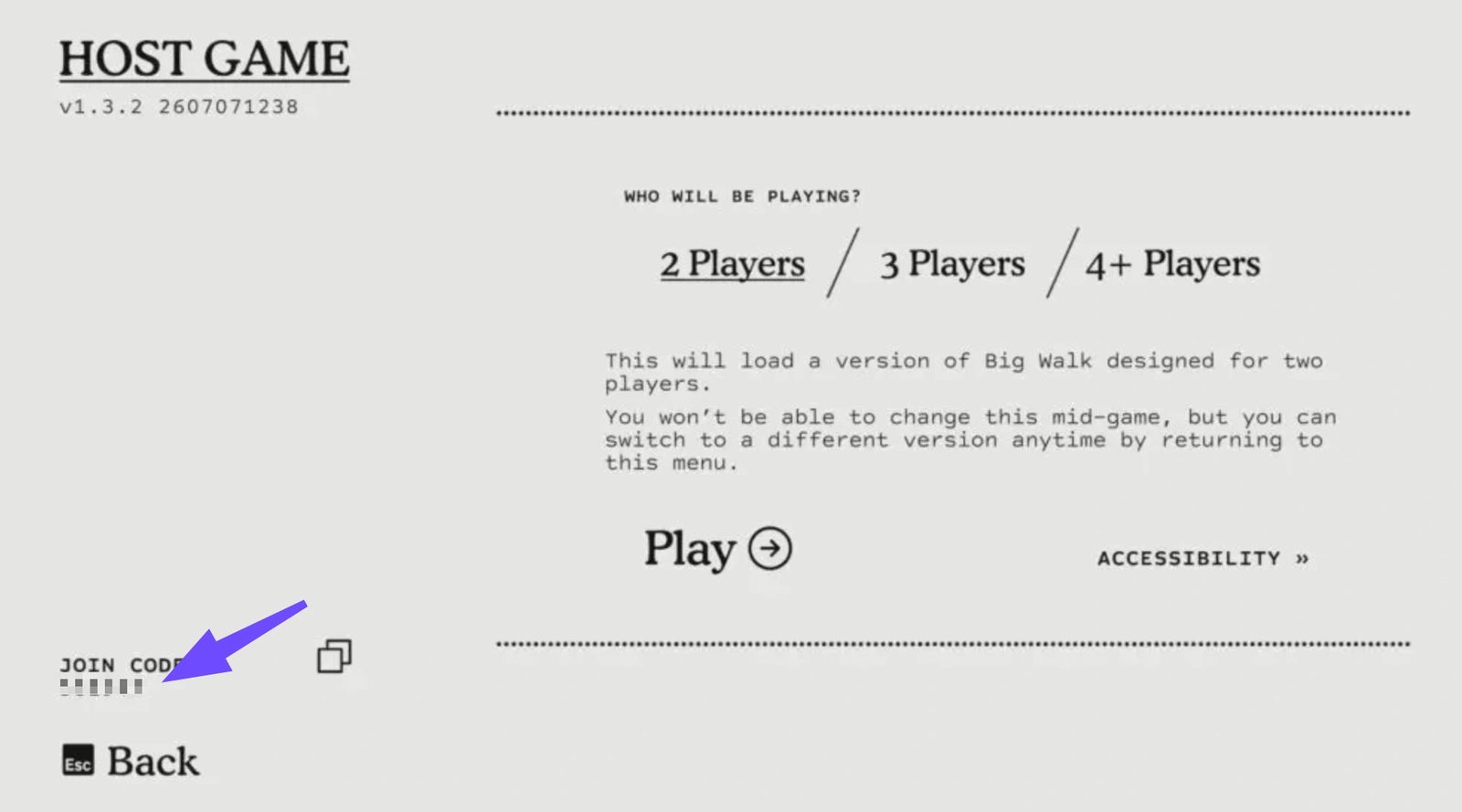
Big Walk's "Host Game" screen. Your JOIN CODE sits in the bottom-left corner — this is the code you send to friends. (Screenshot: PC version via LagoFast; the menu is identical on PS5.)
Step by step:
- Launch Big Walk and select Host Game.
- On the "Who will be playing?" screen, pick your player count (2 / 3 / 4+ — this only sets which challenges load, it doesn't cap who can join) and press Play.
- Read the code in the bottom-left corner of the Host Game screen, next to the "JOIN CODE" label.
- Already in the game? Open the in-game menu → Session Details to see the same code, set a password, or check who's in.
Share it carefully. Anyone who has the code can join. The official FAQ recommends setting a password via Session Details if you want control over who gets in — and streamers should keep the code off-screen.
How to Join a Friend Using a Code
You have the host's code — here's what to do with it.
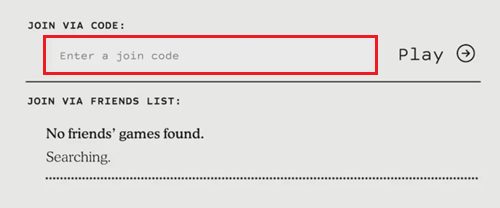
The Join Game screen: type the host's code into the entry field. If a platform friend is already hosting, their game can also appear under the friends list without any code. (Illustration via LagZapper.)
Step by step:
- Launch Big Walk on PS5.
- Confirm your voice settings when prompted.
- On the main menu, select Join Game.
- Type the host's code at the top of the screen — enter it exactly as given, with no extra spaces. Double-check lookalike digits before confirming.
- Wait for the world to load. There's no lobby: you drop straight onto the island.
No code handy? If the host is on your PSN friends list (or Steam/Nintendo, for cross-platform friends), their active session can show up automatically in the "friends games" list on the same screen — pick it and join without typing anything.
Do you need PlayStation Plus? The PlayStation store page lists online play as a PS Plus benefit on PS5 — in practice every PS5 player in the session needs an active subscription. Big Walk was also a PS Plus Monthly game at launch, so several of your friends may already own it — see our PS Plus guide.
PS5 Troubleshooting
Can't find your Join Code
- The code appears once you've selected Host Game. It's in the bottom-left of that screen, then under Session Details in-game.
- Each new session generates a fresh code. If you restarted the game, your old code is gone — grab the new one.
The code doesn't work / friend can't join
Work down this list — it fixes the vast majority of cases:
- Is the host fully in the game? The most common cause of failures: the host must have loaded into the world before the code will connect anyone.
- Get a fresh code. Host closes the session → back to the main menu → starts the journey again → reshares the new code.
- Match your game versions. The official FAQ requires the first two version numbers to match (e.g. both on 1.3.x). On PS5, check for updates manually — consoles don't always auto-patch immediately.
- Check your network. "Connection to Host Timed Out" means your client couldn't reach the host's peer-to-peer session in time. Restart your router, prefer a wired connection, and pause large downloads. Several players on r/BigWalk fixed persistent failures by enabling UPnP on their router.
- Check the system clock. The official FAQ notes that an inaccurate system clock can interfere with joining or hosting.
- Full restart. Completely close Big Walk on both ends (on PS5: highlight the game → Options → Close Game, don't just suspend). A host who suspends the game can leave the session connection occupied, blocking rejoins.
- Swap hosts. If one specific host always fails, have another player host instead.
PS5 ↔ PC: are codes cross-platform?
Yes. Join Codes are the platform-agnostic way to connect — a PS5 player can enter a PC host's code and vice versa, with Switch 2 included too. This is exactly how cross-play works in practice; we cover the full platform matrix in Big Walk Crossplay.
FAQ
What does a Big Walk join code look like? Community-shared codes in the r/BigWalk LFG threads are six digits, numbers only. The official FAQ doesn't specify a format, so just enter the code exactly as the host gives it to you.
Do join codes expire? Effectively, yes. A new code is generated every time the host starts a session, and the old one stops working when that session ends.
Can I join a PC friend's game from my PS5? Yes — type their code into Join Game. Codes work across PS5, PC (Steam/Mac), and Switch 2.
Can I play without PlayStation Plus? Online play on PS5 is listed as requiring PS Plus, so no — each PS5 player needs an active subscription.
Can I lock my session so strangers can't join? Yes — set a password under Session Details. The official FAQ recommends this, and suggests changing it after removing a player.
How many players can one code let in? Up to 12 players total in a session. See our max players guide for how groups of different sizes work.
Why can't I see my friend's game in the friends list? If they're hosting from the Mac App Store version, that build has no friends-list integration — ask them for a Join Code instead. Also check couch co-op vs online if you were hoping to play split-screen on one console — that's not supported.
Can I play solo while waiting for a code? Big Walk is built for 2–12 players; see can you play Big Walk solo for what happens alone.
Sources
- Official Big Walk FAQ — House House — join code generation, Session Details, passwords, Mac App Store limits, version matching, system-clock note
- PlayStation Store — Big Walk — PS Plus requirement for online play
- LagoFast — Fix "Connection to Host Timed Out" — Host Game screenshot, P2P/network fixes
- LagZapper — Big Walk Multiplayer Not Working — join screen illustration, 7-step fix list
- games.gg — How to Play With Friends — PS5 join steps, code location
- r/BigWalk — Looking for Group megathread — live code examples (6-digit observation), finding players
- r/BigWalk — Connection Issues — UPnP fix
RELATED BIG WALK TOPICS
These related pages complete the picture:
Crossplay
Yes — Big Walk supports crossplay across PC, Mac, PS5 and Switch 2, confirmed in the official feature list.
MUL-03Split Screen / Local Co-op
No — Big Walk has no split screen or couch co-op on any platform, per the official FAQ. Same-room workaround: two devices via crossplay.
MUL-01Max Players
Big Walk supports 2-12 players online. Two is focused co-op; twelve is "an absolute mess" per House House.